Online Printing in NZ: How It Works, What Moves the Price and How to Send Files That Print Properly
Ordering print online feels a bit like ordering pizza. You pick a size, tick a few options, upload a file, pay, and a box turns up at the door a few days later. The difference is that a pizza place will ring you if your order looks odd. An online printer, working at volume and often fully automated, will mostly print exactly what you send. That single fact explains both the appeal of online printing in New Zealand and most of the disappointments people have with it.
Get the file right and the system is genuinely convenient: fixed prices on screen, no quoting emails back and forth, and delivery anywhere from Kaitaia to Invercargill. Get it wrong and you can end up with 1,000 business cards where the phone number sits half a centimetre from the trim edge and your deep blue logo has come out purple. This guide walks through how the process works, what actually drives the price, how to prepare files the way NZ printers ask for them, and where the common traps sit.
How online printing works in New Zealand
The workflow is similar across the local operators, even though their websites look quite different. You start on a product page: business cards, an A5 flyer, a poster, a booklet. You choose a size, a paper stock, a quantity and whether you want printing on one side or both. The price updates as you go, because nearly everything in print is a priced option rather than a negotiation.
Next you supply the artwork. Most sites give you three routes: upload a finished print-ready file, build the design in the site’s own online editor using templates, or pay for design help. VistaPrint, for example, offers template-based design and an upload option on the same product page, and also sells a separate design service. Smaller local operators lean harder on the upload route and assume the file arriving is finished.
Then comes the proof, which is where expectations need care. Some printers send a PDF proof for approval before printing. Others show an on-screen preview at the point of order and go straight to production. Copy Express, a long-running NZ print franchise with online ordering, describes its PDF files as electronic soft proofs that show layout and design elements but cannot guarantee colour accuracy. At the other end of the scale, Copybooth states plainly on its sizing page that it does not check artwork at all, because the process is automatic, and Print Online says the same thing in fewer words: jobs are printed as supplied, and not checking files is part of what makes its prices possible.
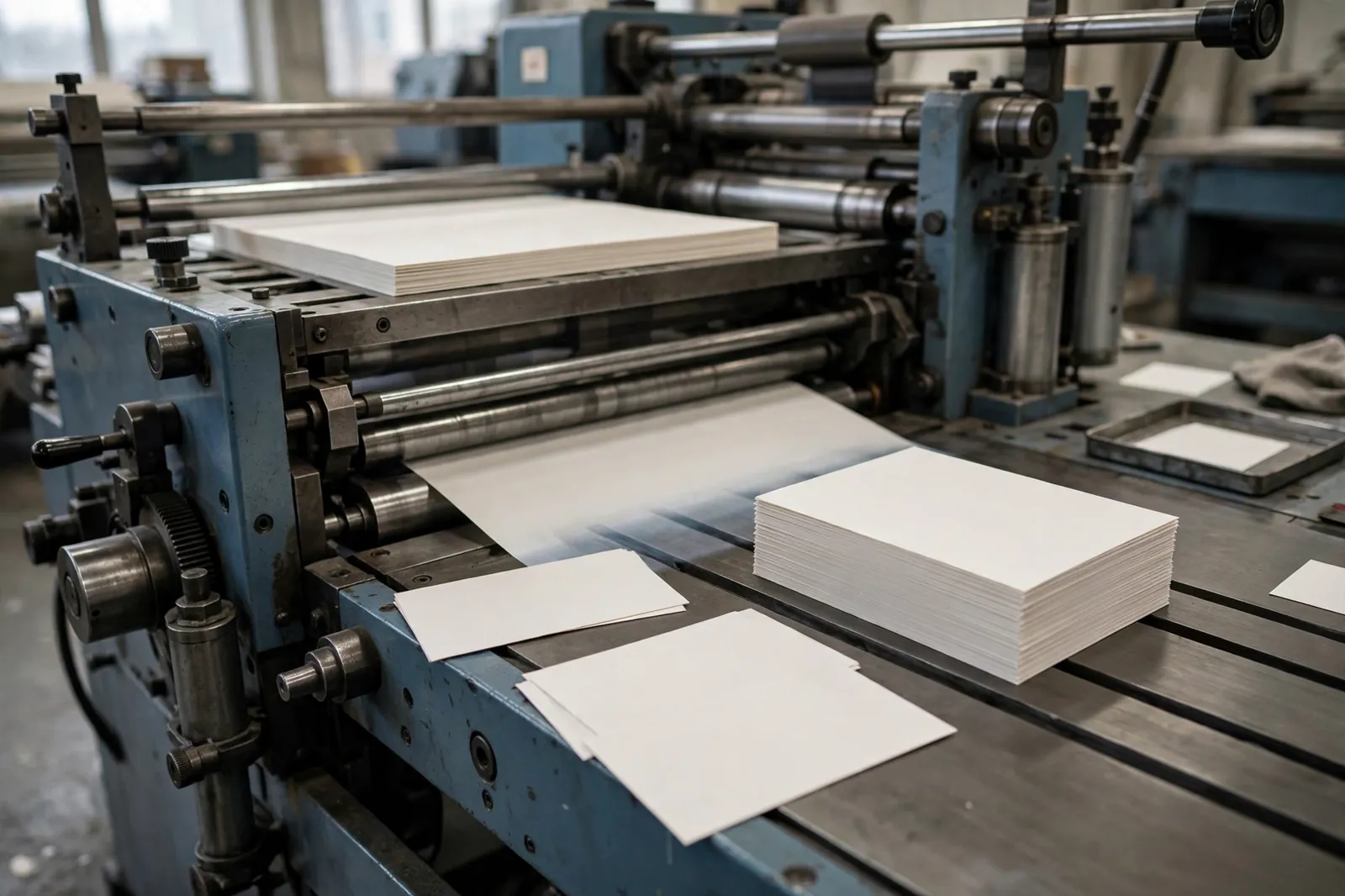
Once approved or submitted, the job goes into a production queue. Small items like cards and flyers are usually printed digitally or ganged together with other jobs on shared sheets, which is how online prices stay low. Finishing follows: trimming, folding, laminating, binding. Then the order is packed and couriered, or held for collection if the printer has a physical site.
Payment is typically upfront by card. That is worth remembering if you are used to a local printer invoicing on a 20th-of-the-month account. Online print is a retail transaction, not a trade relationship, and the price you see assumes you have done the preparation work yourself.
What businesses order most
The catalogues of NZ online printers cluster into a few families, and it helps to know which family your job belongs to because the pricing logic differs between them.
Cards and small marketing pieces are the volume end of the market: business cards, postcards, rack cards, loyalty cards and compliment slips. These are standardised products with fixed sizes and stocks, sold in set quantity steps. The Print Company, an Auckland-based online printer, sells its premium business cards in runs of 250, 500 and 1,000, and its flyer range starts at 200 copies.
Flyers, leaflets and brochures cover the A-series sizes (A6, A5, A4, DL) plus folded formats. Single sheets are the simple end; folded brochures add a finishing step and a file setup with panels in the right order.
Posters and large format work runs from A3 up to A0 and beyond. Copybooth lists poster sizes from A3 through A0 plus the B sizes, and The Print Company warns that oversize delivery fees can apply to items larger than 1800 x 1800mm, a reminder that big prints cost money to move as well as to make.
Booklets and documents are the page-count family: stapled or bound booklets, manuals, reports, training material. Print Online sits squarely here, pricing A4 black and white document printing from 12c per page, with folding, binding, stapling and punching among its finishing options and paper from 80gsm to 300gsm. Its range extends to posters, booklets and building plans, which hints at how wide the document end of the market runs: the same upload-and-print model that handles a 200-page specification handles a set of architectural plans, and the pricing unit shifts from the item to the page.
That shift matters when you are comparing quotes. A per-page service suits long documents with a page count you already know. A per-item catalogue suits marketing pieces where the run length and stock do the damage. Businesses with both kinds of work often end up using both kinds of printer, and there is nothing unusual in that.
Signage, banners and stickers round out most catalogues, along with stationery such as letterheads and envelopes. These ranges vary the most between printers, and shaped or specialty items (die-cut flyers, spot UV finishes, foil) are usually priced as premium lines rather than standard ones.
What actually drives the price
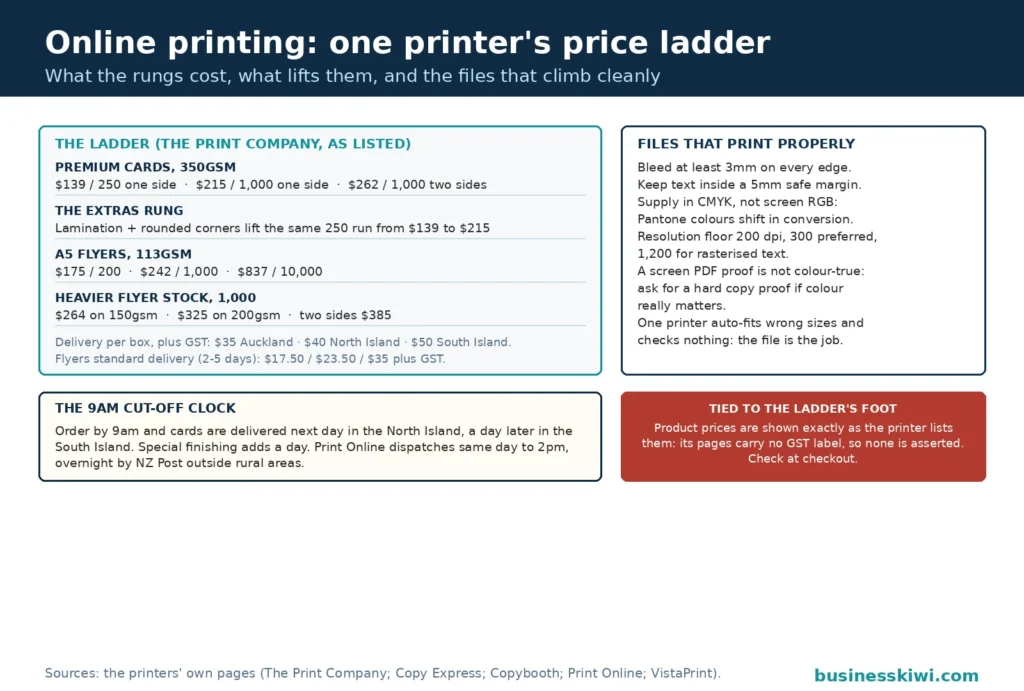
Print pricing looks mysterious until you see a full price ladder for one product. The Print Company’s A5 flyer, single sided on its lightest 113gsm stock, is listed at $175 for 200 copies, $242 for 1,000, and $837 for 10,000. Read those as per-flyer prices and the shape of print economics appears: about 88c each at 200, about 24c each at 1,000, and under 9c each at 10,000. The setup cost of a job is spread thinner with every extra copy, which is why quantity is the single biggest lever you control.
The other levers, in rough order of impact:
- Stock weight and type. The same A5 flyer at 1,000 copies single sided is $242 on 113gsm, $264 on 150gsm and $325 on 200gsm at The Print Company. Heavier, thicker paper costs more and feels more substantial; on business cards the jump is similar, with The Print Company’s 350gsm premium cards priced from $139 for 250 single sided.
- Sides printed. Double siding is not double the price, because the paper and setup are already paid for. The Print Company’s double sided A5 flyer on 113gsm is $385 at 1,000 copies against $242 single sided.
- Finishing. Lamination, rounded corners, folding, creasing and spot UV all add steps. On The Print Company’s premium cards, lamination lifts 250 single sided cards from $139 to $215, and rounded corners do the same. The company also notes that jobs needing laminating, creasing or folding take an extra day, so finishing costs time as well as money.
- Size and coverage. Bigger sheets use more paper and more machine time. Full-bleed, heavy ink coverage designs can also nudge you towards heavier stocks, because thin paper and heavy coverage are a poor mix.
- Turnaround. Speed is a priced option everywhere. Faster production slots and faster couriers both cost more than standard ones, which the delivery section below shows in actual dollars.
- Delivery itself. Freight is a real line item, not an afterthought, especially for heavy boxes of paper heading to the other island.
One caution applies to every figure above: check whether prices are shown including or excluding GST before you compare two sites. Print Online quotes its free delivery threshold as orders over $100 excluding GST, and The Print Company quotes its delivery charges plus GST. Product pages differ too, so the honest comparison is always the total at checkout for the same specification.
Print-ready files: bleed, margins, colour and resolution
Every reprint horror story starts in the file. Printers publish their requirements because they would rather your job worked first time, and the requirements are consistent in spirit even where the numbers differ slightly.
Bleed. If your design runs to the edge of the page, the artwork has to extend past the trim line so the guillotine never exposes a white sliver. Copy Express requires a minimum of 3mm bleed on anything printed to the edge. Copybooth asks for 3–5mm and publishes the working sizes: a business card is supplied at 96 x 61mm and cut back to 90 x 55mm, an A4 flyer at 216 x 303mm cut to 210 x 297mm.
Safe margins. Bleed protects the outside; margins protect the content. Copy Express says to keep text and images at least 5mm inside the trim line. Copybooth is stricter, asking for text, pictures and logos at least 1cm from the edge on business cards. VistaPrint’s own customer guidance on its slim card page suggests key details at 10–16pt type and nothing smaller than 8pt, because small type that looks fine on a zoomed screen can be unreadable at real size.
Colour mode. Files should be built in CMYK, the four process colours print actually uses. Both Copy Express and Copybooth state this directly. A file supplied in RGB, the colour model of screens, gets converted, and conversion is where bright blues, greens and oranges most often shift. Copy Express also notes that many Pantone spot colours show a marked shift when converted to four-colour process, so a brand colour specified as a Pantone needs a deliberate CMYK equivalent, not a hopeful one.
Resolution. Images need enough data. Copy Express sets a floor of 200 dpi with 300 dpi recommended for best quality, and asks for rasterised text or logos at 1200 dpi. Copybooth recommends 150–300 dpi and warns that lower resolutions can pixelate. A logo pulled from a website is almost never big enough; it will print soft or blocky no matter which printer you choose.
Format and fonts. PDF is the common denominator. Copy Express asks Photoshop users for a 300 dpi file at full size saved as PDF with fonts embedded. Copybooth accepts PDF, JPEG, PNG or TIF, and stresses embedding fonts so text does not substitute or shift. If a font is missing at the printer’s end, something else takes its place, and the proof you approved may not show it.
Proofing and colour: why the screen is not the job
The most common complaint in online printing is some version of “it looked different on my monitor”. Printers are blunt about why. Your screen shows colour in RGB, backlit, and every monitor renders tones, contrast and brightness differently. Paper shows colour in reflected light, through ink absorbed into a stock. Copybooth lists the variables plainly: uncoated paper has a different white to coated paper, one brand of paper differs from another, and one printer’s output differs from another’s. VistaPrint makes the same point from the stock side, explaining that glossy paper makes colours and photos pop while matte stock absorbs ink and can make rich designs look deeper, so the identical file will not look identical across stocks.
Treat the digital proof for what it is: a check of layout, spelling, positioning and page order. Copy Express is explicit that a PDF soft proof cannot guarantee colour accuracy, and offers a hard copy proof for jobs where colour is critical. That option costs money and time, but for a large run in brand colours it is the only proof that means much.
Two habits reduce surprises. First, proofread the actual PDF at 100 percent size, not a thumbnail, and have someone who did not design the file read it too. Automated printers print what you send, typos included. Second, order a small run first if the job is new and the quantity is large. A short run costs more per piece, yet far less than reprinting 10,000 flyers because a colour or a date was wrong.
Turnaround and delivery across New Zealand
Production time and courier time are separate clocks, and online printers describe both if you read the product pages carefully.
The Print Company runs its schedule off a 9am cut-off: order and pay on a business day before 9.00am and next day delivery is available, guaranteed in the North Island, with South Island deliveries the day after unless you buy a special courier service. Jobs with special finishing take an additional day, and large orders may take longer. Its next day delivery charges are quoted per box, plus GST: $35 within greater Auckland, $40 elsewhere in the North Island, $50 to the South Island. Standard delivery, which its flyer page prices for a 2–5 day service, runs $17.50 plus GST locally in Auckland, $23.50 plus GST across the North Island and $35 plus GST for island-to-island economy. Collection is possible from its Mt Eden site, with a same-day express collection option at $40 plus GST.
Print Online works to a later daily cut-off and a different model: order by 2pm and the job is dispatched the same working day, with overnight delivery NZ wide through NZ Post, rural delivery excluded from the overnight promise. Delivery is free on orders over $100 excluding GST, and starts from $8.99 below that.
The practical reading of those numbers: an urgent job in Auckland can genuinely be in your hands tomorrow, a South Island address usually adds a day, and rural delivery sits outside everyone’s fastest promise. Build the courier leg into your deadline rather than counting from the print date, and treat cut-off times as hard edges. Missing a 9am cut-off by ten minutes can cost you a full day.
Mistakes that cause reprints
Most reprints trace back to a handful of errors, and printers’ own help pages read like a catalogue of them:
- No bleed, or the wrong finished size. Artwork supplied at trim size with colour running to the edge comes back with white edges or gets stretched to fit. Copybooth warns that incorrectly sized artwork is automatically fitted to its template, which can cost quality.
- Text too close to the edge. Content inside the safe margin risks being trimmed. Guillotines are accurate, not perfect, and a stack of paper can shift slightly.
- Low-resolution images. A 150 dpi floor and a 300 dpi recommendation exist because printers cannot invent detail that is not in the file.
- RGB files and unconverted Pantones. The conversion happens anyway; the only question is whether you see the result before or after printing.
- Unembedded fonts. Substituted fonts change line breaks, spacing and sometimes the entire look of a document.
- Approving the preview without reading it. VistaPrint notes that its preview does not display artwork at true physical size, so type that looks comfortable on screen may be tiny in the hand. Its printing is fully automated, as is much of the industry, and designs are reproduced exactly as submitted.
- Wrong assumptions about finishing. Folded pieces bring their own quirks: Copybooth notes that folded edges can show white through toner cracking, a normal finish behaviour that still surprises people who expected a seamless fold.
When a local print shop still beats online
Online printing wins on price for standardised work, on convenience, and on catalogue depth. It is not always the right tool.
A local shop earns its keep when the job needs a conversation: an unusual stock you want to feel first, a colour match against an existing brochure, a bound document with pages in an odd order, or a deadline measured in hours where handing a file across a counter beats any courier network. Walk-in shops also tend to eyeball files as part of the service, which quietly removes several of the mistakes listed above. If your artwork is rough, the design fee a local printer charges may be cheaper than one botched online run.
There is also a middle path many businesses settle into: online for the standardised, repeatable work (cards, flyers, posters, document runs) and local for the fiddly, one-off, colour-critical jobs. Nothing about that split is a compromise. It is simply matching each job to the process that handles it best.
Frequently asked questions
How much does it cost to print 1,000 business cards online in NZ?
It depends on the card and the printer, which is why any single figure needs a name attached. As one published example, The Print Company lists its premium business cards on 350gsm stock at $215 for 1,000 single sided, and $262 for 1,000 double sided. Other printers price differently, and lamination or rounded corners move the number again, so compare like for like at checkout.
What file format should I send an online printer?
PDF is the safest choice and the one printers ask for most often. Copy Express asks for PDFs with fonts embedded, built at 300 dpi for photographic work. Some printers also accept JPEG, PNG or TIF files; Copybooth lists all four. Whichever format you use, build it in CMYK with bleed included rather than sending a screen-ready file and hoping for the best.
How much bleed do I need to add?
Plan on 3mm as a working minimum. Copy Express specifies a minimum of 3mm bleed for anything printed to the edge, and Copybooth asks for 3–5mm, supplying a business card at 96 x 61mm to be cut to 90 x 55mm. Check your chosen printer’s template, because their number is the one that matters.
Why did my printed colours look different from my screen?
Because screens and paper are different technologies. Monitors display RGB colour with backlight; print uses CMYK ink on a stock that absorbs it. Copybooth points out that paper brand, coating and even the printer itself shift the result, and a PDF proof shows layout rather than guaranteeing colour. For colour-critical work, ask about a hard copy proof before committing to the full run.
How fast can I get business cards printed online in NZ?
Faster than most people expect, if you meet the cut-offs. The Print Company offers next day delivery on orders placed and paid before 9am on a business day, guaranteed in the North Island, with the South Island a day later and extra time for special finishing. Print Online dispatches by the same working day for orders placed by 2pm, with overnight delivery NZ wide excluding rural addresses.
Do online printers check my artwork before printing?
Often not, and the honest ones say so. Copybooth states that it does not check artwork because its process is automatic, and Print Online prints files as supplied. Some services send a proof for your approval, but approving it is your check, not theirs. Read the final PDF closely before you submit or approve anything.
Is it cheaper to print documents at home or online?
For anything beyond a handful of pages, online document printing usually wins on running cost. Print Online prices A4 black and white printing from 12c per page and puts home printing at 50c or more per page once ink and toner are counted. Your own printer still wins on immediacy for two pages at 9pm, but not on cost per page across a long document.
What paper weight should I choose for flyers?
Think about where the flyer will live. Light stocks around 113–150gsm suit letterbox drops and handouts where cost per piece matters most; The Print Company’s A5 flyer runs from 113gsm up to 200gsm, with the 1,000-copy single sided price rising from $242 to $325 across that range. Heavier stock suits counter displays and anything that needs to feel substantial or survive handling.
Sources
- The Print Company (theprintcompany.co.nz), Premium Business Cards product page: variant pricing for 350gsm cards at 250, 500 and 1,000, laminated and rounded corner options, delivery charges and cut-off times.
- The Print Company (theprintcompany.co.nz), A5 Flyer product page: price ladders by stock (113gsm, 150gsm, 200gsm), sides and quantity from 200 to 10,000, standard and next day delivery charges.
- Copy Express (order.copyexpress.co.nz), Artwork Guidelines: 3mm bleed, 5mm safe margin, CMYK requirement, 200–300 dpi image resolution, PDF proofing and hard copy proof position.
- Copybooth (copybooth.co.nz), Sizing and Specs page: full bleed artwork sizes, 3–5mm bleed, 150–300 dpi recommendation, CMYK and font embedding requirements, automatic processing and no artwork checking policy.
- VistaPrint New Zealand (vistaprint.co.nz), Small Business Cards product page: card sizes (91 x 55mm standard, 85 x 40mm slim, 65 x 65mm square), 400gsm stock, stock and finish behaviour, guidance on type size and preview limitations.
- Print Online (printonline.co.nz), home page: A4 black and white printing from 12c per page, 2pm same-day dispatch cut-off, overnight NZ Post delivery excluding rural, free delivery over $100 excluding GST, paper range 80–300gsm and finishing options.
This article is general information about how online printing services in New Zealand work and what affects their pricing. Prices, specifications and delivery terms quoted here were published by the named printers on their own websites at the time of writing and will change over time. Always check the current price and file requirements on the printer’s own site before ordering.