Remote Working Jobs in NZ: How Remote Work Actually Works Here

Search for remote working jobs in New Zealand and you will mostly find job ads. What the ads rarely explain is the machinery underneath: who can ask for remote work, what an employer must do with that request, who pays for the desk and the power bill, and what happens at tax time. It is an explainer, not a job board, so there are no vacancy lists here. Instead you will find the rules, the money and the practical setup, drawn from Employment New Zealand, WorkSafe, Inland Revenue and Immigration New Zealand.
What remote, hybrid and remote-first actually mean
None of these terms has a legal definition in New Zealand. Employers use them loosely, and the same word can mean different things at different companies, so the wording in your employment agreement matters more than the label in an ad.
Fully remote means the role is done away from an employer’s premises as the normal arrangement, usually from the employee’s home. Occasional head office or team days aside, the home is the workplace. Hybrid means the week is split: some days at home, some days at the employer’s site, in a pattern usually set by policy or agreement. Remote-first describes how a company is organised rather than where one person sits. The business is set up so that work, meetings and documents default to people being in different places, even if it also keeps an office. A fourth label, flexible working, is broader: it covers changes to hours and days as well as place of work, and it is the term New Zealand employment law uses.
Which kinds of work can be done remotely
Remote work suits roles where the work itself travels well. If the job is done on a computer and a phone, the output can be measured without watching someone do it, and nothing physical has to be handled, location stops mattering much. Roles that commonly fit include software development and IT support, design and content work, writing and editing, accounting and bookkeeping, finance and insurance administration, customer support and contact centre work, sales roles run by phone and video, and much public sector policy and administration.
The mirror image is just as useful. Work involving physical presence, machinery, patients, customers on site, secure facilities or handling goods generally cannot move home. Many roles sit in between: paperwork and meetings can be done from anywhere, but site visits, inspections or face-to-face appointments anchor part of the week. Those roles tend to end up hybrid.
The law: asking to work from home
New Zealand law does not give anyone a right to work from home. What it gives every employee is a right to ask, with duties on the employer in how the request is handled. The rules sit in Part 6AA of the Employment Relations Act 2000, and Employment New Zealand sets out how they work in practice.
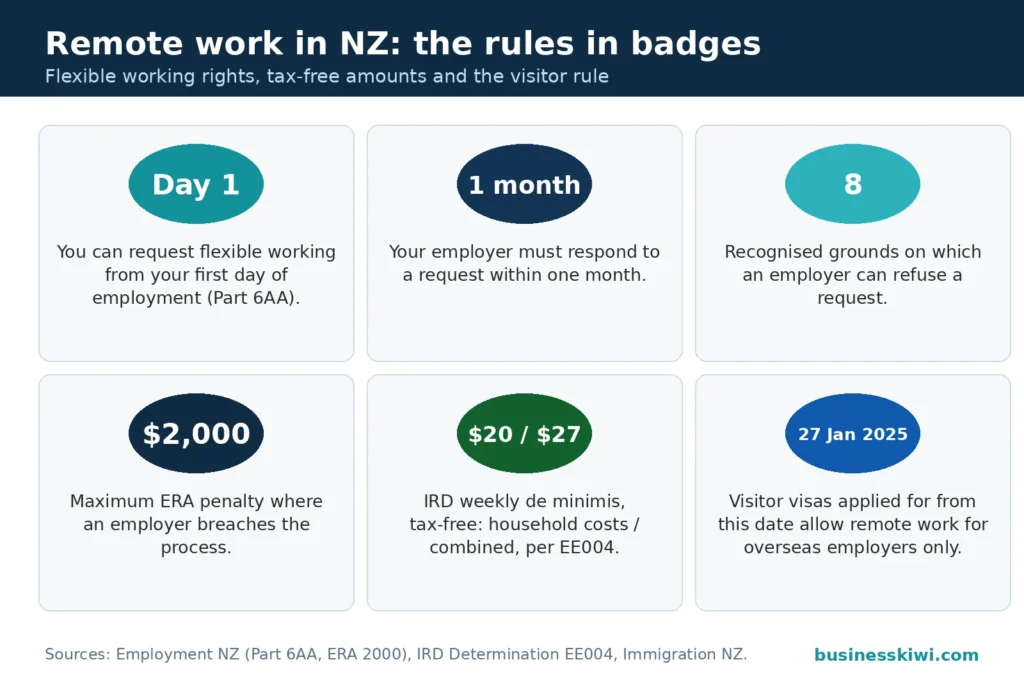
Any employee can make a flexible working request, from their first day of employment, for any reason. There is no minimum service period and no need to justify it. The request can cover hours, days or place of work, and it can be permanent or for a set period.
The request must be in writing and include:
- your name and the date
- a statement that the request is made under Part 6AA of the Employment Relations Act 2000
- the change you want and how long you want it to last
- the date you want it to start, and an end date if it is temporary
- an explanation of how the arrangement could work for both you and your employer
- any changes your employer might need to make if they agree
Keep a copy of your request and note when you sent it; Employment New Zealand suggests this, and it matters if timing is ever disputed.
Your employer must respond in writing as soon as possible and no later than one month after receiving the request. The deadline can be extended if you both agree to a trial of the arrangement. If your request is missing information, the employer can ask you to fix it and resubmit.
An employer can decline only on one or more recognised business grounds, or if the arrangement would conflict with a collective agreement, in which case they must decline. The recognised grounds are:
- the work cannot be reorganised among existing staff
- additional staff cannot be recruited
- there would be a detrimental impact on quality
- there would be a detrimental impact on performance
- there would not be enough work during the periods the employee proposes to work
- planned structural changes
- the burden of additional costs
- a detrimental effect on the employer’s ability to meet customer demand
A refusal is not valid just because a manager prefers everyone in the office: the employer must state which ground or grounds they are relying on and explain their reasons. If the request is approved, the arrangement should be recorded in writing, for example in the employment agreement; where the place of work changes permanently, Employment New Zealand says the agreement should be updated.
If things go wrong, the complaint route is narrower than many people expect. You can complain that the employer did not follow the required process: the written response, the timeframe, the stated grounds. You cannot complain simply because the request was refused, or because you disagree with the reasons. Employment New Zealand’s route is a Labour Inspector first; failing that, mediation, then the Employment Relations Authority. Deadlines apply: within 12 months of a refusal, or within 13 months of the employer receiving the request if there was no response. If the Authority finds the process was not followed, it can impose a penalty of up to $2,000, payable to the employee.
Health and safety duties do not stop at the front door
The Health and Safety at Work Act 2015 applies to home workers in the same way it applies to anyone else. A business must ensure, so far as is reasonably practicable, the health and safety of its workers, including people working from home. Workers have duties too, including cooperating with reasonable policies and instructions.
WorkSafe’s guidance is practical about what this means. The business should engage with the worker about the setup before an arrangement is agreed, not after problems appear. Hazards need to be identified and risks eliminated or minimised, the same discipline as in an office. WorkSafe suggests applying similar furniture and equipment standards at home as on site, considering workstation assessments, and having a clear way to report discomfort, pain or incidents early. If a healthy workstation genuinely cannot be set up in the home, WorkSafe’s position is that working from the office should be considered instead.
Isolation is the other risk both WorkSafe and Employment New Zealand flag. Regular home workers can drift out of the loop socially and professionally; regular calls or video contact, some office time where possible, and managers who check in on workload and wellbeing are the standard countermeasures. Monitoring is not a free-for-all either: Employment New Zealand notes that monitoring employees at home must comply with the Privacy Act 2020, and employers may need extra security, such as remote login tokens or work-issued devices.

Setting up a home workstation properly
The core equipment is an adjustable chair with proper back support, an external keyboard and mouse rather than a laptop touchpad, and an external screen or a stand that raises the laptop screen. A laptop on a kitchen table, with its small keyboard and trackpad, forces a hunched posture and is a common cause of wrist and shoulder strain.
The setup details are simple but specific. Sit with your feet flat on the floor and your thighs roughly horizontal, backrest adjusted so your lower back is supported. The desk height should let your shoulders stay relaxed, your elbows hang naturally and your forearms sit horizontal. The screen belongs about an arm’s length away, its top around eye height. Keep the keyboard flat, with the space bar roughly 10cm from the desk edge. Clear trip hazards such as trailing cords, check electrical gear is in good condition, and keep smoke detectors working.
Breaks matter as much as furniture. WorkSafe recommends about five minutes away in every hour of continuous mouse and keyboard work, plus micropauses of a few seconds every three to five minutes. For your eyes, look away for about 20 seconds at something in the distance every 20 minutes or so. Change position at least hourly, and avoid standing at a raised desk for more than about 45 minutes at a stretch. Report aches and pains early: WorkSafe’s warning signs include dull aches that hang around, numbness, pins and needles, pain that disturbs sleep, and pain lasting more than 24 hours.
Money and tax: who pays for working from home
There is no legal entitlement to a work-from-home allowance in New Zealand. Employment New Zealand is clear that paying for equipment and running costs is a matter of agreement between employer and employee. An employer might supply the equipment, ask the employee to provide it, or pay an allowance toward costs, with the amount and timing agreed between them. General household utilities such as electricity, gas and water are usually treated as the employee’s cost.
The tax treatment is where Inland Revenue comes in. A payment from an employer toward an employee’s home working costs is normally taxable income for the employee, unless it fits the exemption in section CW 17 of the Income Tax Act 2007, which covers reimbursements of costs that would be deductible if employees were not blocked from deducting employment expenses. Inland Revenue’s Determination EE004, which applies to payments from 1 April 2023 with no end date, sets out amounts employers can treat as exempt without detailed calculations:
- $20 per week for the extra household costs of working from home, such as power and internet, where the employee does not use their own phone plan or devices for work
- where the employee also uses their own telecommunications tools or usage plan, a combined de minimis amount of $27 per week covering both household and telecom costs
- alternatively, $20 per week plus up to 75 percent of the employee’s usage plan bill where the plan is used principally for business, or $20 per week plus up to 25 percent where it is used principally for private purposes
- for newly bought gear, a one-off safe harbour of up to $400 toward new telecommunications equipment and up to $400 toward new furniture and other equipment, such as a desk or chair
A few conditions are worth knowing. The $400 safe harbour amounts are one-off, not annual, and each applies across all the equipment bought, not per item. The home-based work must be more than minor for the weekly amounts to apply, so an occasional day at home in an otherwise office-based job will not qualify. Rent, rates and mortgage interest never qualify: Inland Revenue’s reasoning is that those costs do not increase when you work from home, so they are private costs, not additional ones. And the determination is a safe harbour, not a binding cap; an employer can treat other amounts as exempt if they can show the payment genuinely meets the section CW 17 test.
The flip side is what employees cannot do. Because of the employment limitation in the Income Tax Act, employees generally cannot claim home working costs in their own tax returns. There is no employee expense claim for your power bill, broadband or desk. The system handles these costs through the employer reimbursement route above, or not at all.
What a remote work agreement usually covers
Employment New Zealand’s guidance points to the arrangement being written down, and a good written arrangement deals with the questions that otherwise become arguments later. Typically that means the place of work and whether the change is permanent or a trial, the days and hours involved, how availability will work, who supplies equipment and who pays which costs, health and safety responsibilities and any workstation check, security and privacy expectations, and how the arrangement will be reviewed or ended. A trial agreed after a flexible working request should be recorded in writing too, with start and end dates and any changes to pay or conditions during it. Skipping this is how misunderstandings about expenses, hours and office attendance begin.
Working from New Zealand for an overseas employer
Remote work crosses borders easily; tax law does not. Two separate questions decide the position, and Inland Revenue stresses they are different: immigration status, and tax residency. Immigration status governs whether you can be in New Zealand and what you can do here; tax residency governs what tax you pay.
You become a New Zealand tax resident if you are in New Zealand for more than 183 days in any 12-month period, or if you have a permanent place of abode here: a place you usually live, whether or not you own it. Part days count as whole days, the 183 days need not be consecutive, and residency is backdated to the first of those days. Tax residents are taxed on their worldwide income, so a salary from an employer overseas is still taxable here once you are resident.
If you live in New Zealand and work for an overseas employer, the payroll mechanics need sorting out early. Inland Revenue’s position is that if your overseas employer does not need to register as an employer in New Zealand, you need to register as an IR56 worker and handle your own PAYE through employment information returns, unless your employer registers here or arranges for someone else to manage your employment tax. Non-cash benefits, such as health insurance, count as income and go in those returns too.
Visitors are a separate case on both fronts. On the immigration side, Immigration New Zealand states that all visitor visas applied for on or after 27 January 2025 allow the holder to work remotely in New Zealand for an overseas business or client, with no limit on the amount. The permission is narrow: it does not cover work for a New Zealand employer, work exchanged with a New Zealand business or person for goods or services (free accommodation in return for a review is INZ’s example), or work that requires you to be in New Zealand. Working for a New Zealand employer requires a work visa. On the tax side, INZ notes a visitor working remotely may still face a New Zealand tax bill; where the income is taxed in another country there may be no New Zealand tax if the stay is under 92 days in a 12-month period, and people tax resident in a country New Zealand has a tax treaty with may be able to stay up to 183 days before New Zealand tax applies. Inland Revenue has a non-resident visitor category for visitors here up to 275 days in any 18-month period who keep working for a home-country employer, which can remove the need for IR56 registration. These thresholds interact in messy ways, so anyone planning this should check their own position with Inland Revenue before starting.

How to find remote roles
Job boards and company careers pages carry remote roles, and the search is worth doing deliberately. Use the location and workplace filters rather than scrolling general listings, and try the vocabulary employers actually use: remote, work from home, WFH, hybrid, flexible, distributed. Then read past the label. What decides whether a role is genuinely remote is the location eligibility (many overseas-listed remote roles quietly require you to live in a specific country or time zone), any required office days, and whether the employer can legally employ someone based in New Zealand.
Tailor the application to how remote hiring works. Managers recruiting for remote roles screen for written communication, self-management and comfort with the tools of distributed work, so show those things rather than just claiming them. A clear, specific cover letter connecting your experience to the actual role, and a tidy document built from an NZ CV template that puts recent, relevant work first, will do more than a long generic application sent to forty listings. If you are already employed and want your current role to go remote, the flexible working request process above is the formal route, and a well-constructed written request explaining how the arrangement works for the employer is a stronger opening than an informal chat.
For more guides on applications, employment rights and work in New Zealand, browse our Jobs & Education hub.
Frequently asked questions
Can my employer refuse my request to work from home?
Yes, but only on one or more of the recognised business grounds in the Employment Relations Act, such as an inability to reorganise work among existing staff, a detrimental impact on quality or performance, or planned structural changes. They must respond in writing within one month, stating the grounds and reasons. If the arrangement conflicts with a collective agreement, they must refuse it. You can complain if they did not follow the process, but not simply because they said no.
Is my employer required to pay me an allowance for working from home?
No. There is no legal entitlement to a work-from-home allowance in New Zealand; Employment New Zealand treats equipment and costs as a matter of agreement. If your employer does pay toward home working costs, Inland Revenue’s Determination EE004 lets them treat set weekly amounts as tax-exempt, including $20 per week for household costs and up to $27 per week where your own phone plan and devices are used too.
Can I claim my home office costs in my own tax return?
Generally no. Employees cannot deduct the costs of their employment under the Income Tax Act, so there is no individual claim for power, broadband or furniture used for work. The system deals with these costs through your employer: a reimbursement from your employer can be tax-exempt within the rules in Determination EE004, but you cannot claim the same costs yourself.
Can I work remotely from New Zealand for an overseas employer?
If you live in New Zealand, yes, but expect tax obligations here. Once you are a New Zealand tax resident, which happens after more than 183 days in any 12-month period or when you have a permanent place of abode here, your overseas salary is taxed in New Zealand, and you may need to register as an IR56 worker and handle your own PAYE if your employer does not register here. Visitors are covered by different rules: visitor visas applied for on or after 27 January 2025 allow remote work for overseas employers and clients, but never for a New Zealand employer.
Does my employer still have health and safety duties when I work from home?
Yes. The Health and Safety at Work Act 2015 duty to protect workers, so far as is reasonably practicable, covers people working from home. WorkSafe expects the business to talk through your workstation setup, identify hazards, apply similar equipment standards to the office where it can, and have a way for you to report pain or problems early.
Sources
- Employment New Zealand, Flexible work: https://www.employment.govt.nz/fair-work-practices/flexible-work
- Employment New Zealand, Asking for flexible working arrangements: https://www.employment.govt.nz/fair-work-practices/flexible-work/asking-for-flexible-working-arrangements
- Employment New Zealand, Responding to a flexible working request: https://www.employment.govt.nz/fair-work-practices/flexible-work/responding-to-a-flexible-working-request
- Employment New Zealand, Working from home: https://www.employment.govt.nz/fair-work-practices/flexible-work/working-from-home
- WorkSafe New Zealand, Working from home: https://www.worksafe.govt.nz/topic-and-industry/working-from-home/
- WorkSafe New Zealand, Setting up a healthy workstation when working from home: https://www.worksafe.govt.nz/topic-and-industry/working-from-home/setting-up-a-healthy-workstation-when-working-from-home
- Inland Revenue, Determination EE004 (27 March 2023): https://www.taxtechnical.ird.govt.nz/determinations/miscellaneous/2023/ee004
- Inland Revenue, Tax residency status for individuals: https://www.ird.govt.nz/international/individuals/tax-residency-status-for-individuals
- Inland Revenue, New Zealand-based employee of an overseas employer: https://www.ird.govt.nz/roles/ir56-workers/employees-of-overseas-employers
- Immigration New Zealand, Working remotely in New Zealand on a visitor visa: https://www.immigration.govt.nz/visit/checking-or-changing-the-conditions-of-your-visitor-visa-or-nzeta/working-remotely-in-new-zealand-on-a-visitor-visa/
Disclaimer
This article is general information about remote work in New Zealand. It is not legal, tax or career advice, and it does not account for your circumstances, employment agreement or any collective agreement applying to you. These settings change; check the official sources linked above for the current position, and get advice from an employment lawyer, tax professional or licensed immigration adviser for decisions that affect you.