Client Accounting Software in NZ: What Your Business Needs and What the Main Options Cost

If you have an accountant, there is a good chance they have an opinion about your bookkeeping software, and it is worth listening to. Client accounting software is the cloud bookkeeping system you work in day to day, issuing invoices, coding bank transactions and filing GST, while your accountant logs into the same file to check your work, prepare your annual accounts and file your tax return. One file, two pairs of eyes, and no shoebox of receipts in March.
The short version of choosing: match the plan to what your business actually does, not what it might do one day. A sole trader with no staff needs something quite different from a growing company with six employees and stock on the shelves. Then check the total cost, because the headline subscription is rarely the whole bill once payroll and card payment fees are added. Finally, ask your accountant which file they would rather work in, because a system they know well usually means a cheaper, faster year end.
Prices in this article were checked on each vendor’s own New Zealand website on 7 October 2026. Vendors change prices and run introductory offers, so confirm the current figure on the vendor’s pricing page before you commit.
The jobs the software has to do for Inland Revenue
Software does not take your legal obligations away. It just makes them easier to meet. These are the jobs it needs to handle, based on what Inland Revenue (IRD) requires.
Keeping records for seven years
IRD requires you to keep all your business records, including electronic ones, for at least 7 tax years. Records must be in English or te reo Māori unless IRD has approved another language, and if your records are stored offshore, which includes cloud storage, either you or your cloud service provider needs IRD’s approval for that arrangement. IRD also expects computer-based records to stay retrievable and readable the whole time, and says that when you change systems, the new system needs to be able to read data from the old one. Your accounting software is where most of those records now live: invoices, bills, bank statements, receipts and the ledger behind them.
GST returns
Once your turnover passes $60,000 a year you must register for GST, charge it on your sales and file GST returns for every taxable period, even if the return is nil. Our GST registration guide walks through registration itself. IRD says a GST return is due by the 28th of the month after the taxable period ends, with two exceptions: the period ending 31 March is due by 7 May, and the period ending 30 November is due by 15 January. There are no extensions of time for GST returns. You can file in myIR, or file through accounting software, which is what most businesses do: the software tallies GST on sales and purchases as you code transactions through the period, then produces the return figures ready to file.
Invoices and sales records
You need copies of the invoices you send and the ones you receive, plus records of any other income. GST-registered businesses also have to give customers the right taxable supply information on each sale. Our invoice guide covers what an invoice needs to show. Invoicing inside the accounting software, rather than in a separate document, means the sale, the GST on it and the payment are all recorded in one place, and the copy IRD expects you to keep is already filed.
Payday filing if you employ staff
Employers must file employment information with IRD every time they pay staff, not once a month. If you file electronically, the information is due within 2 working days of each payday, and employers whose annual PAYE and employer superannuation contribution tax comes to $50,000 or more must file electronically. You can key the information into myIR, upload a file, or file directly from payroll software. That last option is why most employers run payroll inside, or connected to, their accounting system: the pay run creates the filing as part of the process instead of doubling the work.
Year-end information for your accountant
At balance date your accountant needs reconciled bank accounts, a record of what customers owe you and what you owe suppliers, asset purchases, loan balances and the year’s transactions coded consistently. A well-kept cloud file gives them all of that on the day they log in. Business.govt.nz makes the related point that accounting software can also file GST, manage provisional tax through the Accounting Income Method (AIM) and manage payday filing, which is why it suggests talking to software providers, and getting expert help to set things up, when you are choosing systems.
Provisional tax deserves a mention of its own. Businesses whose tax bill is large enough pay income tax in instalments during the year rather than in one lump sum after filing. The standard approach bases those instalments on the previous year’s result, which can be a poor fit for a new or fast-changing business. Business.govt.nz notes that accounting software can manage provisional tax using the Accounting Income Method (AIM), which works from your actual results in the software during the year. If your income jumps around between seasons, that difference alone is worth raising with your accountant when you choose a system.
Features that actually matter
Vendors list dozens of features. These are the ones that decide whether the software earns its fee.
Bank feeds and reconciliation. The software imports transactions from your business bank accounts and credit cards, then you match them against invoices and bills or code them to an account. This is the single biggest time saver in modern bookkeeping, and it is the habit your accountant cares most about: a file reconciled weekly is a file they can trust at year end.
Invoicing and quotes. Look for quotes that convert to invoices, automatic reminders for overdue invoices, and the option for customers to pay by card from the invoice. Card payments cost a transaction fee, so factor that in if your customers use it heavily.
Receipt and expense capture. Photographing a receipt with your phone and having it land in the file, coded and stored, is what keeps the seven-year record complete without a filing cabinet. Some products bundle a dedicated capture tool; others rely on their mobile app.
GST return preparation. The software should build the return from your coded transactions, let you review it, and file it to IRD from inside the product or export exactly what myIR needs.
Payroll. Either built in or as a priced add-on. The questions are how many employees are included, what each extra employee costs per month, and whether payday filing happens automatically as part of the pay run.
Reporting. At minimum: profit and loss, balance sheet, aged debtors and creditors, GST reports and a cash flow view. Your accountant will also want reports they can adjust at year end.
Adviser access. Your accountant and bookkeeper should have their own logins to the same live file, at no extra per-user cost if possible, so questions get answered from the real numbers rather than from a screenshot.
Connected apps. Point of sale, job management, inventory, time tracking and e-commerce tools plug into the main file. A large app marketplace matters if you run specialised software; it matters much less if you do not.
Migration and support. Check how your opening balances and history get in from a spreadsheet or an old desktop package, and what help exists when you are stuck: help articles, email, chat, phone, or your accountant.
None of this needs to be complicated once it is running. The routine that keeps accountants happy is short: reconcile bank feeds weekly while transactions are still recognisable, send invoices the day work is done rather than at month end, photograph receipts as they arrive, and glance at your profit and loss and aged debtors once a month. Software that makes those four habits easy will serve you better than a longer feature list you never open.
The main options in New Zealand
Xero
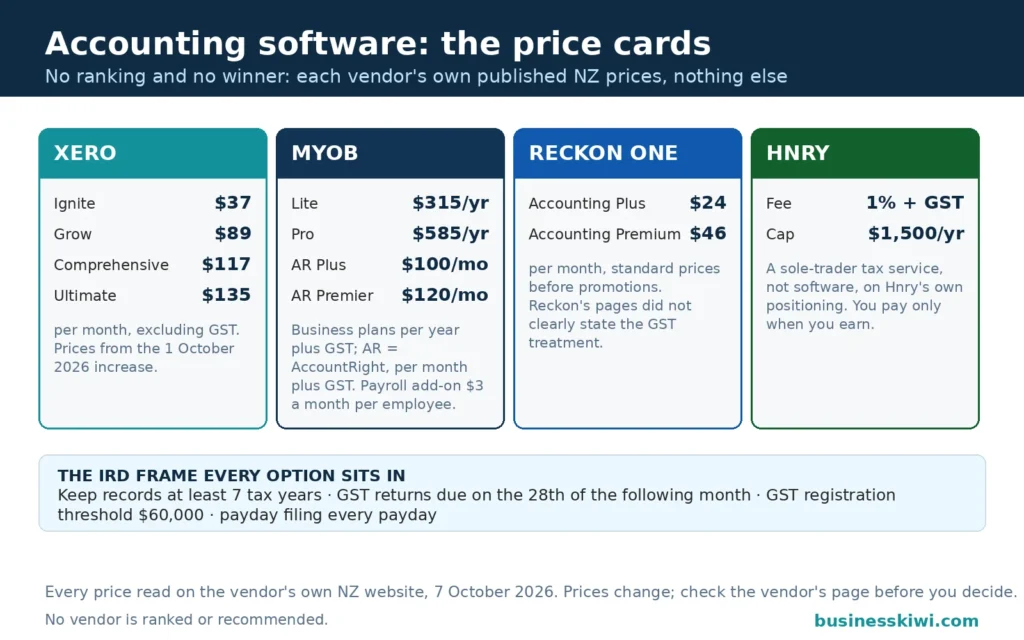
Xero sells four business plans in New Zealand, priced monthly in New Zealand dollars and excluding GST. Xero lifted its NZ prices on 1 October 2026, and the current standard prices on its own pricing pages are Ignite at $37 a month, Grow at $89 a month, Comprehensive at $117 a month and Ultimate at $135 a month. New customers were being offered 80% off base plans for the first three months when we checked.
Xero describes Ignite as accounting basics for businesses starting out, and its pricing terms note that Ignite carries limits on invoices. Grow is aimed at the self-employed and growing businesses. Comprehensive is the plan Xero pitches at businesses with employees, with accounting and payroll streamlined together. Ultimate adds forecasting tools for businesses planning to scale, and includes payroll for 10 people, with each additional person NZ$2 a month after the October 2026 price change. On payroll, Xero says its payroll complies with payday filing and files employee pay details with IRD each pay run once it is connected. The Xero App Store carries hundreds of third-party apps, the widest ecosystem of the products covered here. Xero says all of its plans cover the accounting essentials, with room to step up a plan as you grow.
MYOB
MYOB is the other long-established name in NZ small business accounting. Its cloud product, MYOB Business, is priced by the year for the two main plans, plus GST. Lite is $315 a year at the standard price, aimed at sole traders and small businesses with up to 2 employees: unlimited professional invoices and quotes, connection for up to 2 bank accounts, GST tracking and reporting, receipt scanning and storage, and basic reports. Pro is $585 a year at the standard price, for small to medium businesses with multiple employees: unlimited bank account connections, receipt scanning, advanced reporting and analytics, and tracking for budgets and jobs. When we checked, MYOB was offering both plans at half price for the first year after a 14-day free trial.
Payroll sits on top of those plans rather than inside them: you can add payroll for $3 a month plus GST per employee, for up to 2 employees on Lite and unlimited employees on Pro. There is also a standalone Payroll Only plan at $25 a month plus GST, which runs pay runs, reports directly to IR and automates KiwiSaver calculations. Bigger or more complex businesses step up to AccountRight Plus at $100 a month plus GST, which adds unlimited inventory and priority support, or AccountRight Premier at $120 a month plus GST for multiple currencies and a second business. MYOB says bank feeds are available on all MYOB Business subscriptions, with daily feeds from the main NZ banks. One extra cost to know about: if customers pay your invoices online by card, MYOB’s terms put the fee at 2.7% plus 25 cents per transaction.
Hnry
Hnry is not really software in the same sense, and it only suits one group: sole traders. Instead of a monthly subscription, Hnry charges 1% plus GST of your self-employed income, capped at $1,500 plus GST a year, and you only pay when you earn. Your income is paid into a Hnry Account, and Hnry calculates, deducts and pays your income tax, GST, ACC levies and student loan repayments as you get paid. Its team of accountants files your income tax and GST returns, manages the expenses you raise in the app so the tax relief flows through as you go, and answers your tax questions as part of the service. You also get unlimited invoices and quotes, reports, and a free mileage tracking app. There are no bank feeds or reconciliations to do, because your income flows through the Hnry Account rather than your own bank account. If you have staff to pay or you trade through a company, Hnry is not built for you. If you are a sole trader who wants tax handled as you earn rather than at deadlines, it is a genuinely different answer to the same problem.
Reckon
Reckon One takes a modular approach: you pick an accounting tier and add payroll only if you need it. Reckon’s NZ site lists standard monthly prices of $24 for Accounting Plus, aimed at small businesses, and $46 for Accounting Premium, aimed at larger ones, with payroll modules at $16 a month for up to 4 employees, $32 for up to 10, and $60 for larger teams. Every plan includes unlimited users, GST tracking and reporting, budgets, reports and phone and chat support, and Reckon offers free data migration and a free onboarding session. Bank transactions are included up to 1,000, with a fair use policy beyond that. Reckon’s pages lead with steep introductory discounts, and the GST treatment of its listed prices was not clear from the pages we read, so confirm the standard price and whether GST is included before you rely on the figures.

How to choose
Start from your business shape. Sole trader, no staff: Hnry, MYOB Lite, Xero Ignite or Reckon’s entry tier can all work, and the choice is whether you want tax taken off as you earn (Hnry) or a bookkeeping file you and your accountant share. Employing staff: payroll mechanics and per-employee fees matter more than the base price, and payday filing needs to be automatic. GST registered: every product here prepares GST returns, so the question becomes how much coding work is left for you. Carrying stock: check inventory carefully, because it tends to be a step-up feature, unlimited on MYOB’s AccountRight Plus, for example, rather than a standard inclusion.
Ask your accountant before you buy. Accountants work in these files all day. If yours is set up for one system, your year end will be quicker, their questions fewer, and they may be able to set the file up correctly from the start. Business.govt.nz gives the same advice in general terms: talk to providers, try a few systems, do not choose on cost alone, and consider paying for setup help if you are not confident.
Add up the real cost. Base subscription, plus payroll per employee per month, plus card payment fees if your customers pay that way, plus any connected apps, minus whatever introductory discount expires in three or twelve months. A plan that looks $20 cheaper can cost more once two employees and online payments are added.
Use the trial properly. MYOB offers a 14-day free trial, Reckon offers a free trial, Xero was offering new customers 80% off for three months when we checked, and Hnry charges nothing until you earn. Run a real week of invoices and bank coding through your shortlist rather than clicking around the demo screens.

Switching, and keeping your old records
Changing software does not change your obligation to keep records for seven years, including the years sitting in the old system. Before you cancel anything, export the core reports (profit and loss, balance sheet, trial balance), the transaction history and your stored receipts and invoices, and save them somewhere you control. IRD’s guidance on computer records is clear that records must stay retrievable and readable, and that a new system should be able to read data from the old one. Where it cannot, keep the old file accessible, or export the records into a readable form. Many businesses keep the old subscription alive, downgraded or read-only, until the retention period for those years is safely covered, or hold the exports with their accountant. Time the move for a clean boundary, the start of a GST period or the 31 March balance date, so neither file holds half a period. Reckon offers free data migration as part of signing up, and your accountant can usually move opening balances and the chart of accounts across whichever product you choose.
A sensible switching sequence looks like this. Agree the conversion date with your accountant, usually a balance date or GST period end. Reconcile the old file completely to that date, including bank accounts, debtors, creditors and any payroll balances. Bring across opening balances and the chart of accounts first, then outstanding invoices and bills, then as much transaction history as the new product and your patience allow. Run the first GST return in the new file alongside your accountant or bookkeeper, checking it against the old file’s figures for the same period. Only cancel the old subscription once the new file has produced at least one full GST return you trust, and keep the exported records from the old system regardless.
Frequently asked questions
Does accounting software file my GST return for me?
The software prepares the return from your coded transactions. With the main cloud products you can then file to IRD from inside the software, or take the figures into myIR. What it cannot do is know about income or expenses you never entered, which is why reconciling your bank feeds matters. Hnry is the exception: its accountants file for you as part of the service.
Can my accountant work in the same file as me?
Yes, and that is the point of cloud accounting. You invite your accountant and bookkeeper as users on your file, they see the same live figures you do, and year-end work happens in place. Check whether extra users cost anything on the plan you are looking at. Reckon includes unlimited users, and adviser access is a standard part of how Xero and MYOB files are shared with practices.
How much does accounting software cost in total?
Budget for the base subscription plus extras. In round terms, the entry plans from Xero, MYOB and Reckon sit between $24 and $37 a month (or $315 a year for MYOB Lite) before GST. Payroll adds a few dollars per employee per month on MYOB, or a step up to a payroll-inclusive Xero plan, and Hnry instead charges 1% of income up to its annual cap. Introductory discounts make first-year costs lower than the ongoing ones.
I am a sole trader with no staff. Do I need full accounting software?
You need records, not necessarily a full package. A very simple business can run on Hnry, which handles tax as you earn, or on the entry tier of Xero, MYOB or Reckon. A spreadsheet can work at very low volumes, and IRD even provides cashbook templates, but you still have to keep the records for seven years and file GST returns once you are registered.
What happens to my data if I cancel?
That depends on the vendor’s terms, so export before you cancel: reports, transaction listings and your receipt images. Your seven-year duty to Inland Revenue survives the subscription. Keeping the exported records readable, in English, and stored under an arrangement that meets IRD’s requirements is your responsibility once the account is closed.
Sources
- Inland Revenue, Record keeping; Computer record keeping for audit; Filing GST; Payday filing, ird.govt.nz
- Business.govt.nz, Making tax time easier, business.govt.nz
- Xero New Zealand, Pricing plans; Pricing update, xero.com/nz
- MYOB New Zealand, MYOB Business plans and pricing; Bank feeds, myob.com/nz
- Hnry, Sole trader tax payments and filings, hnry.co.nz
- Reckon New Zealand, Reckon One plans and pricing, reckon.com/nz
All prices were checked on the vendors’ own New Zealand websites on 7 October 2026.
Disclaimer
This article is general information about accounting software and tax obligations in New Zealand. It is not accounting, tax or business advice for your situation. Prices, plans and features change, and introductory offers come and go, so check the vendor’s current pricing page and talk to your accountant before making a decision.
For more small business guides, see our Business & Industry hub.